clai — AI for the Command Line
clai turns a language model into a regular shell command. It reads input (stdin), does what the prompt says, prints the result (stdout). Everything else (grep, jq, git, cat) works with it the way it always has.
stdin → LLM → stdout
brew install maxrodrigo/tap/claigo install github.com/maxrodrigo/clai/cmd/clai@latestSetup the model
export OPENAI_API_KEY=sk-...    # or ANTHROPIC_API_KEY, GOOGLE_API_KEY
ollama pull llama3.3            # or run fully local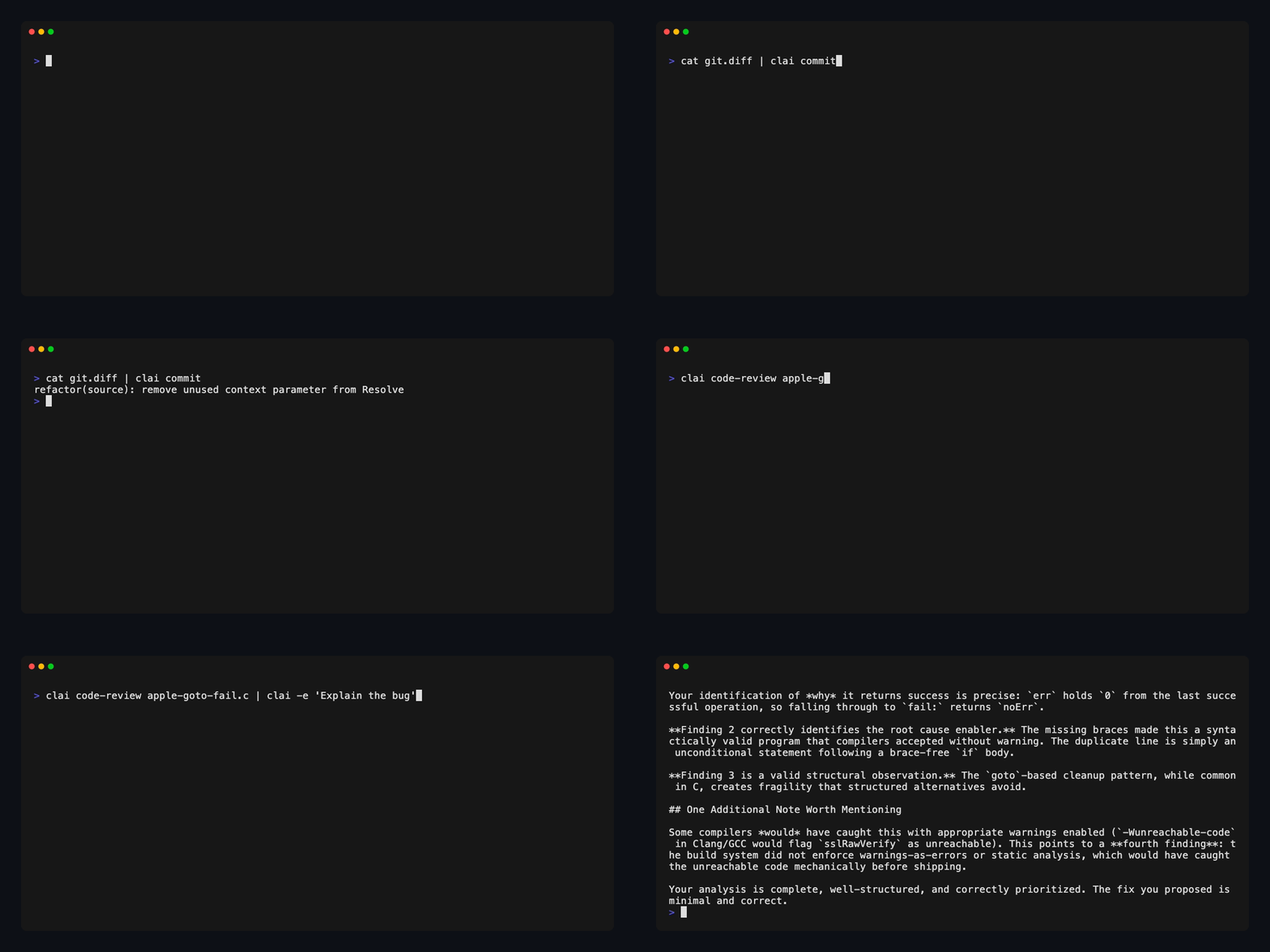
How a clai pipeline works
Every token has a job.
$ clai summarize article.txt
- clai — reads from stdin, calls the LLM, writes to stdout.
- summarize — built-in prompt: condenses the input into key points.
- article.txt — any text file passed as an argument. Piped stdin also works.
$ git diff | clai code-review
- git diff — produces a unified diff of your working changes.
- | — connects stdout of git to stdin of clai. No temp files.
- clai — reads the diff from stdin and passes it to the LLM.
- code-review — built-in prompt: finds bugs, security issues, and performance problems.
$ clai draft research/*.md --strategy self-refine
- clai — reads all input files, concatenates them, sends to LLM.
- draft — built-in prompt: writes a long-form blog post from notes, outlines, or sources.
- research/*.md — glob pattern: all markdown files in your research folder, read concurrently.
- --strategy — applies a reasoning strategy before generating output.
- self-refine — the LLM critiques its own draft and rewrites it. More tokens, better output.
$ pdftotext invoice.pdf - | clai parse -s '{"vendor":"str","amount":"float"}'
- pdftotext — extracts text from a PDF. clai doesn't parse files, that's the shell's job.
- | — passes the extracted text directly to clai.
- clai — processes the text through the LLM.
- parse — built-in prompt: extracts structured data from unstructured text.
- -s — validates output against a JSON schema. Exit code 3 on mismatch.
- schema — shorthand syntax. clai validates the output and retries if the shape is wrong.
$ clai draft sources/*.md | clai proofread > post.md
- clai (1) — first LLM call: synthesizes multiple source files into a draft.
- draft — writes a long-form blog post from the input.
- sources/*.md — all markdown files in the sources folder.
- | — the draft output becomes input to the next LLM call.
- clai (2) — second LLM call: polishes the draft from the previous step.
- proofread — built-in prompt: fixes grammar, clarity, and flow without changing meaning.
- > post.md — redirect final output to a file. Compose with any shell tool.
What is clai?
clai turns a language model into a regular shell command. It reads input (stdin), does what the prompt says, prints the result (stdout). Everything else (grep, jq, git, cat, pbpaste, xclip) works with it the way it always has.
Summarize a web page. Code-review a diff. Turn research notes into a blog post. Extract structured JSON from a PDF. Or chain two LLM calls together, first one drafts, second one edits. You stay in the terminal the whole time.
Works with OpenAI, Anthropic, Gemini, Bedrock, Vertex AI, Ollama, and anything OpenAI-compatible.
Switch providers with -m. Run locally with Ollama if nothing should leave your machine.
- Pipeline-native — stdin in, stdout out. Chains with grep, jq, awk, curl.
- Built-in prompts — summarize, draft, code-review, commit, translate, parse, proofread, and more.
- Multi-provider — OpenAI, Anthropic, Gemini, Bedrock, Vertex, Ollama. One flag to switch.
- Reasoning strategies — Chain-of-Thought, Chain-of-Draft, Tree-of-Thought, Self-Refine.
- Structured output — JSON schema validation. Exit code 3 on mismatch, so scripts can trust the shape.
- Custom prompts — markdown files with frontmatter. Version them. Share them.
Prompts
A prompt is a markdown file that tells the model what to do. Call it by name, or write one inline with -e.
echo "find all Go files modified this week over 10KB" | clai shell-cmd
find . -name '*.go' -mtime -7 -size +10k
Strategies
A flag that changes how the model thinks before answering. cot for step-by-step, cod for minimal notes (cheaper), tot to explore multiple paths, self-refine to critique and rewrite. Learn more →
clai explain --strategy cot problem.txtCustom prompts
Your prompts live in plain files. Edit them. Version them. Frontmatter sets defaults; the body is the instruction. Full guide →
cat ~/.config/clai/prompts/standup.md
---
description: Turn a git log into a standup update
model: openai/gpt-4.1-mini
---

Write a three-bullet standup update from this git log.
git log --oneline --since=yesterday | clai standupStructured output
Pass a schema with -s and clai validates the output. If it doesn't match, you get exit code 3. Scripts can rely on the shape. Schema syntax →
clai parse -s '{"vendor": "str", "amount": "float"}' invoice.txt
{"vendor": "Acme Hosting", "amount": 129.00}
What can you do with clai?
Real one-liners you can copy and run. Each one pairs clai with tools you already have. More examples →
Content
Summarize a YouTube video from the command line
Grab the transcript with yt-dlp, pipe it to clai. Done.
auto-generated subtitles via yt-dlp
yt-dlp --write-auto-subs --skip-download -o "/tmp/video" "URL"
cat /tmp/video*.vtt | sed '/^[0-9]/d; /-->/d' | clai summarize
or use whisper for better transcription
yt-dlp -x --audio-format wav -o /tmp/audio.wav "URL"
whisper /tmp/audio.wav --output_format txt
clai summarize < /tmp/audio.txt
Generate a blog post from multiple sources
Point draft at a folder of notes. It reads them all and writes a post.
blog post from a folder of notes
clai draft research/topic/*.mdsteer the angle
clai draft research/*.md -e "Focus on the developer experience angle"self-refine for better output
clai draft notes.md transcript.txt --strategy self-refinefetch a source, combine with notes, draft and polish
curl -s "https://r.jina.ai/URL" > /tmp/ref.txt
clai draft /tmp/ref.txt my-notes.md --strategy self-refine | clai proofread > post.md
Summarize a web page from the terminal
Fetch the page as clean text, pipe it in.
jina reader strips navigation and ads
curl -s "https://r.jina.ai/https://example.com/article" | clai summarizeor lynx for simple pages
lynx -dump "https://example.com/article" | clai summarizeWrite a LinkedIn post or tweet from an article
Two prompts, chained. First one reads, second one formats.
straight from a url
curl -s "https://r.jina.ai/URL" | clai linkedin
curl -s "https://r.jina.ai/URL" | clai tweet
or from a local file
clai summarize article.txt | clai tweetGit & Code
Code review a pull request
Pipe the diff through clai before you read it yourself.
review a github pr
gh pr diff 42 | clai code-reviewfilter to critical issues only
gh pr diff 42 | clai code-review | clai -e "Only critical bugs, numbered"review working changes
git diff | clai code-reviewWrite git commit messages
Pipe your staged diff. Get a conventional commit message back.
git diff --cached | clai commitExplain a confusing diff or error
Pipe it in, ask what it means.
explain a commit
git show abc1234 | clai -e "Explain what this change does and why"explain the last error
!! 2>&1 | clai -e "Explain this error and suggest a fix"Generate a changelog from git log
Feed it the commits between two tags. Get a formatted changelog.
git log --oneline v0.1.0..HEAD | clai changelogData & Documents
Extract structured JSON from a PDF
clai doesn't read PDFs. Extract the text first, then parse it.
extract invoice fields
pdftotext invoice.pdf - | clai parse -s '{"vendor":"str","amount":"float","date":"date","items":"list"}'pipe to jq
pdftotext invoice.pdf - | clai parse -s '{"title":"str","tags":"list"}' | jq '.tags[]'Convert prose to CSV or JSON
Free-form notes in, structured data out.
clai to-csv report.txt > data.csv
clai to-json notes.txt | jq .
Process files in bulk
Let the shell fan out. clai handles each file.
parallel code review
find . -name "*.go" | xargs -P4 -I{} sh -c 'clai code-review "{}" > "{}.review"'add frontmatter to all docs
for f in docs/*.md; do
  clai -e "Add YAML frontmatter with title and description" "$f" > "$f.new" && mv "$f.new" "$f"
done
Advanced
Use reasoning strategies for hard problems
Pick a strategy based on the task. Some cost more tokens but think harder.
step-by-step for debugging
cat failing-test.go | clai -e "Why does this test fail?" --strategy cotexplore multiple solutions
clai -e "How should I structure this API?" --strategy tot design.mdself-critique for polished writing
clai draft notes.txt --strategy self-refinesave tokens in batch jobs
for f in src/*.go; do
  clai code-review --strategy cod "$f" >> reviews.txt
done
Write in your own voice
Make a voice file. Extend any prompt with it. Full guide →
create your voice file
mkdir -p ~/.config/clai/prompts/shared
cat > ~/.config/clai/prompts/shared/voice.md << 'EOF'
I write in first person. Short sentences. No corporate speak.
Words I never use: leverage, synergy, unlock.
EOF
create a prompt that uses it
cat > ~/.config/clai/prompts/my-draft.md << 'EOF'
---
extends: draft
prepend:
  - shared/voice.md
---
EOF
use it
clai my-draft research/*.mdPick models per task
Cheap local models for simple stuff. Frontier models when it matters.
local model, nothing leaves your machine
clai summarize -m ollama/llama3.3 confidential.txtfrontier model for hard reasoning
clai -e "Evaluate this architecture" --strategy tot -m anthropic/claude-sonnet design.mdset defaults per prompt
export CLAI_MODEL_CODE_REVIEW="anthropic/claude-sonnet"
export CLAI_MODEL_SUMMARIZE="openai/gpt-4.1-mini"
export CLAI_MODEL_COMMIT="ollama/llama3.3"
Preview without spending tokens
--dry-run shows what would be sent. Free.
clai draft research/*.md --strategy self-refine --dry-run